
Field Tech Hiring System Full Kit
The Excel hiring tracker, plus automation that adds each new Indeed applicant as a row.
Each applicant gets your must-have questions by email, and their reply is saved on their row. You make every call.
$49.00
Buy nowPay once. No subscription.
If a file won't open, won't work on your computer or Microsoft plan, or isn't what the page described, we fix it or refund you, your choice. Tell us within 14 days of your purchase.
Questions? Email support@tightshiphq.com
- Works in Excel, not Google Sheets.
- The automation needs a Microsoft 365 business plan.
How it works
The automation needs Microsoft 365 Business Basic, Standard, or Premium (or an enterprise plan) and a one-time setup with the included guide.
Applicants
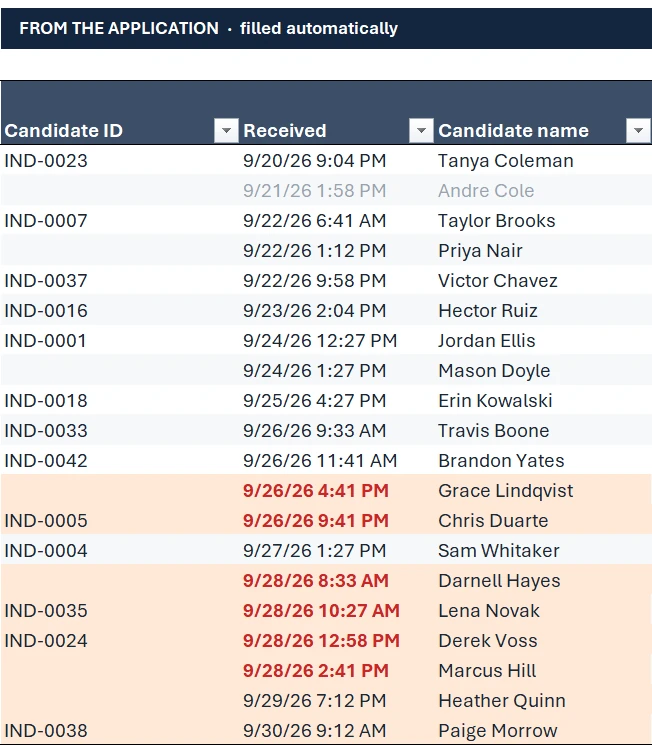
Sample data
- Email subject
- [Action required] New application for HVAC Install Technician, Delaware, OH
- Candidate ID
- IND-0038
- Received
- 9/30/26 9:12 AM
- Candidate name
- Paige Morrow
- Applied for
- HVAC Install Technician
- Location
- Delaware, OH
- Stage
- New
Step 1. An Indeed application email arrives in Outlook.
Within a few minutes, a new row appears in your tracker with the applicant's name, the job, their location, and the time it came in.
Gate Questions
Sample data
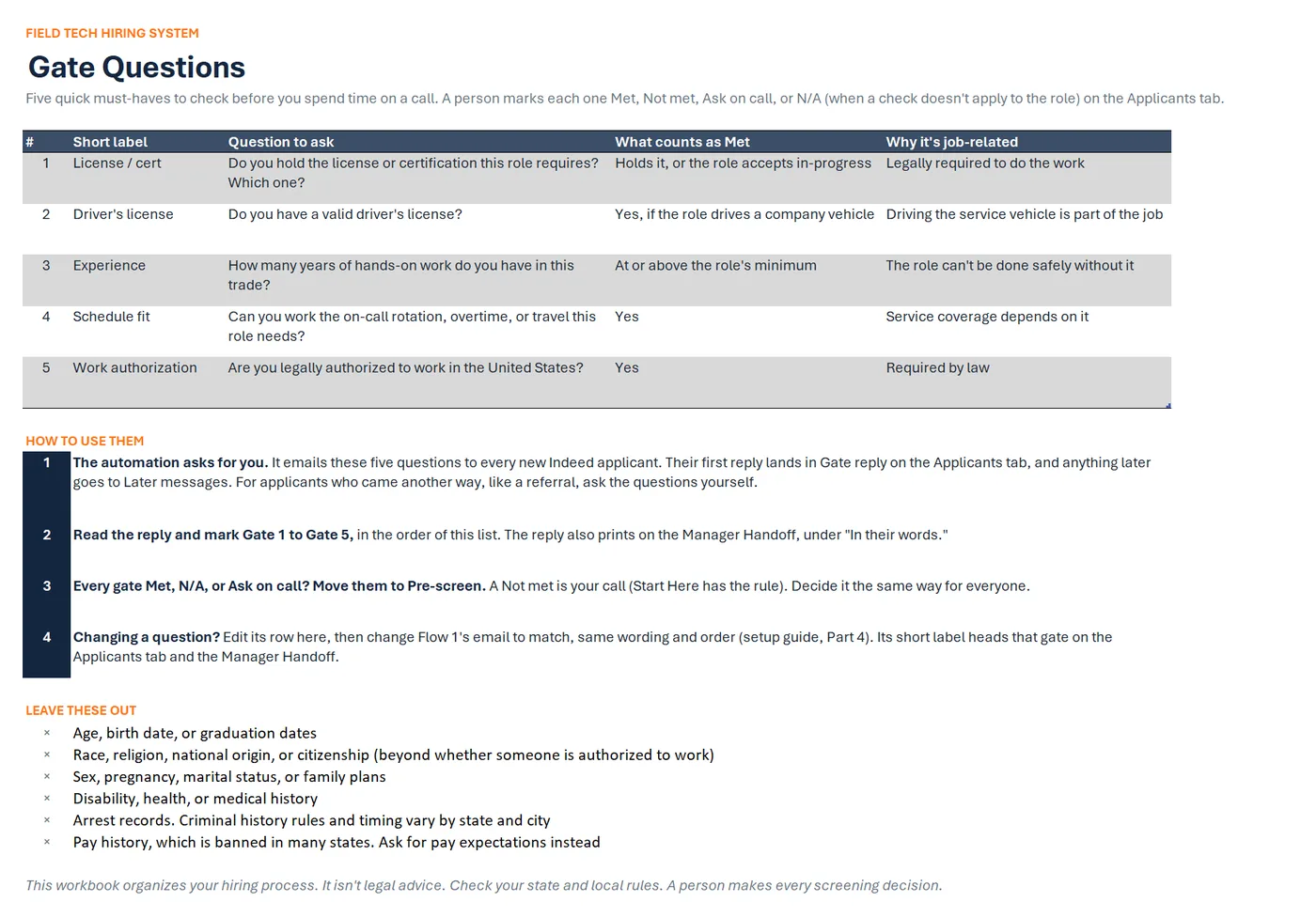
- 1License / certDo you hold the license or certification this role requires? Which one?
- 2Driver's licenseDo you have a valid driver's license?
- 3ExperienceHow many years of hands-on work do you have in this trade?
- 4Schedule fitCan you work the on-call rotation, overtime, or travel this role needs?
- 5Work authorizationAre you legally authorized to work in the United States?
- Candidate name
- Paige Morrow
- Gate questions sent
- 9/30/26 9:15 AM
Step 2. Your gate questions go to the applicant by email.
The row records when they went out.
The Gate Questions tab: five must-have checks, what counts as Met, why each is job-related, how to use them, and questions to leave out.
Applicants
Sample data
- Candidate name
- Sam Whitaker
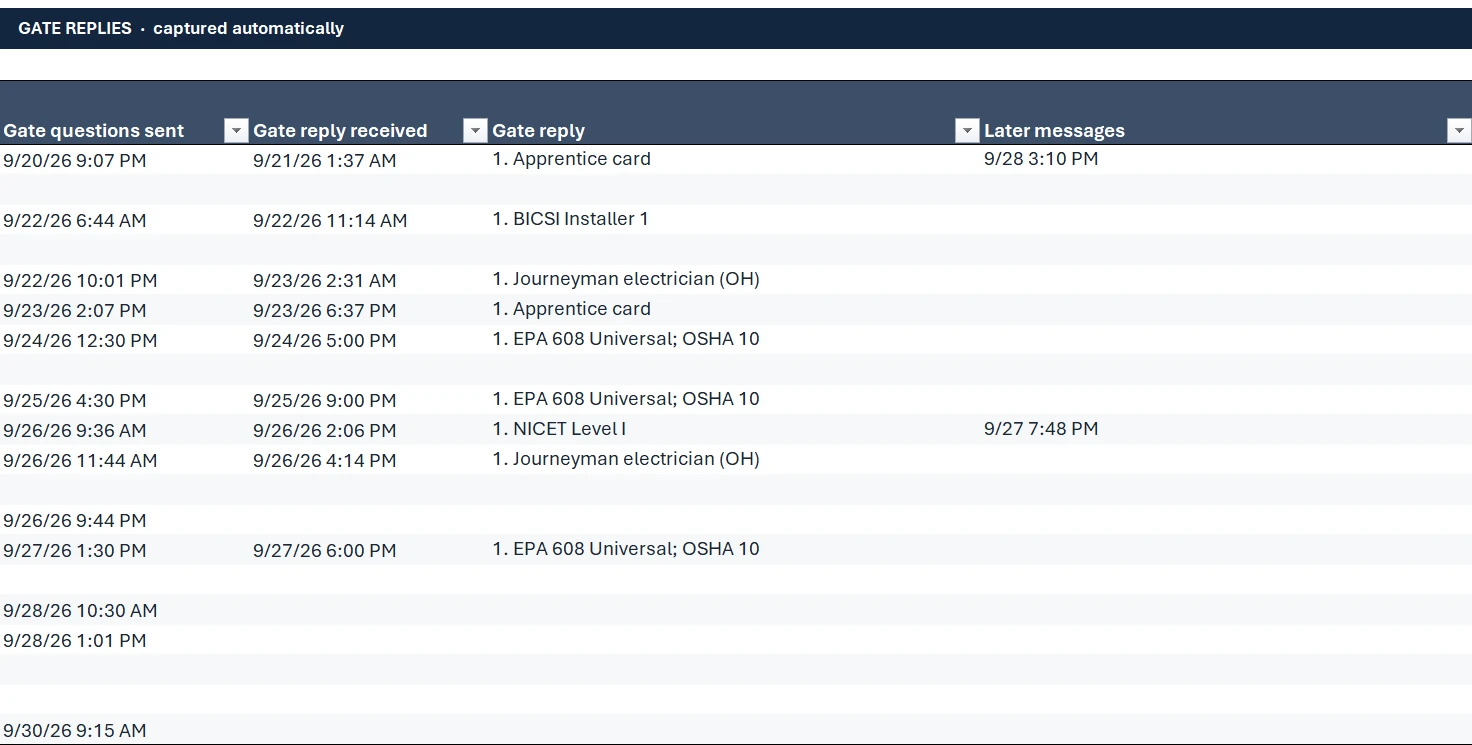
- Gate questions sent
- 9/27/26 1:30 PM
- Gate reply received
- 9/27/26 6:00 PM
Gate reply
- 1. EPA 608 Universal; OSHA 10
- 2. Yes
- 3. 8 years in hvac
- 4. Yes, on-call is fine
- 5. Yes
Step 3. When the applicant replies, their first reply is saved as text on their row.
Anything they send after that is kept in its own column, so their answers are never overwritten.
The Applicants tab with sample data: when gate questions went out, when each reply came in, and the reply saved as text on the applicant's row.
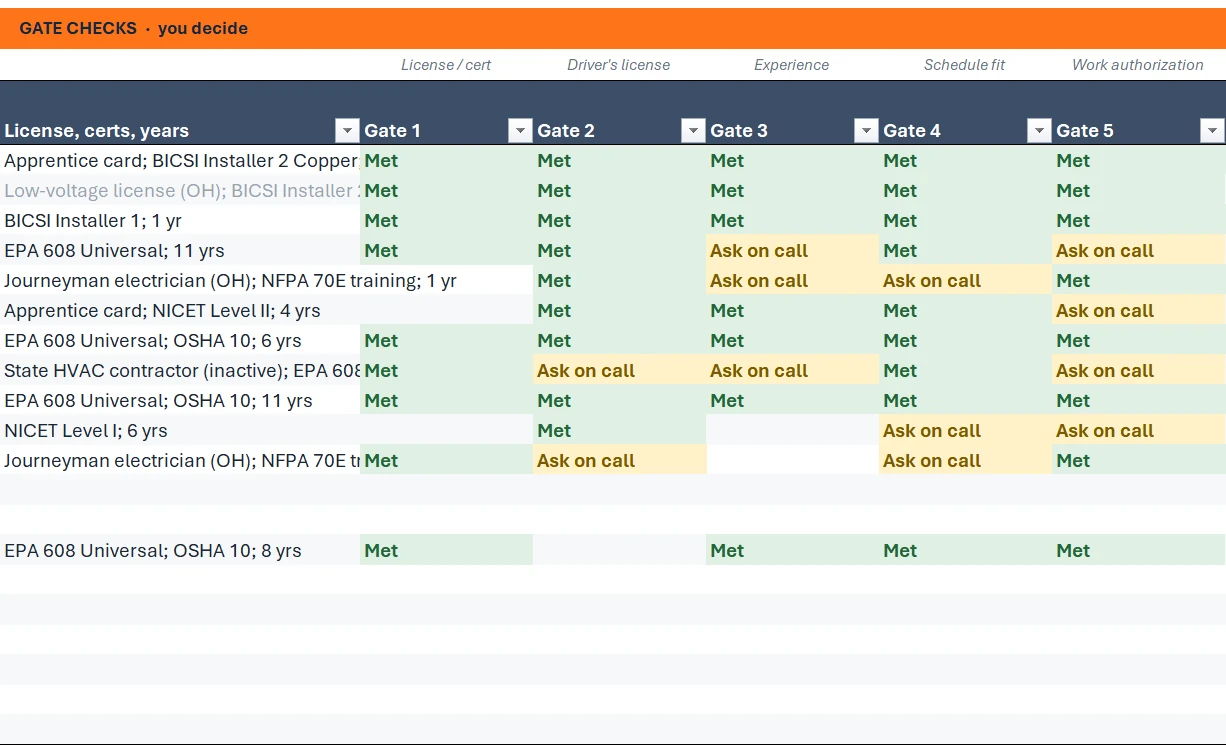
GATE CHECKS · you decide
Brandon Yates
Sample data
- License / cert1. Journeyman electrician (OH)Met
- Driver's license2. Yes but it's out of state, transferring itAsk on call
- Experience3. 5 years in electrical
- Schedule fit4. Depends on the week, can talk about itAsk on call
- Work authorization5. YesMet
A person marks each oneMetNot metAsk on callN/A
Step 4. You read each reply and mark each gate question yourself.
It doesn't screen, score, rank, or reject anyone.
CANDIDATE SUMMARY FOR THE HIRING MANAGER
Sample data
Miguel Santos
Journeyman Electrician · Hilliard, OH · IND-0025
- Phone
- (614) 555-0156
- miguel.santos.5665@example.com
IN THEIR WORDS · the candidate's reply to the gate questions
- 1. Journeyman electrician (OH)
- 2. Yes
- 3. 8 years in electrical
- 4. Yes, on-call is fine
- 5. Yes
Reply with one word, or tick one:
AdvanceHoldPass
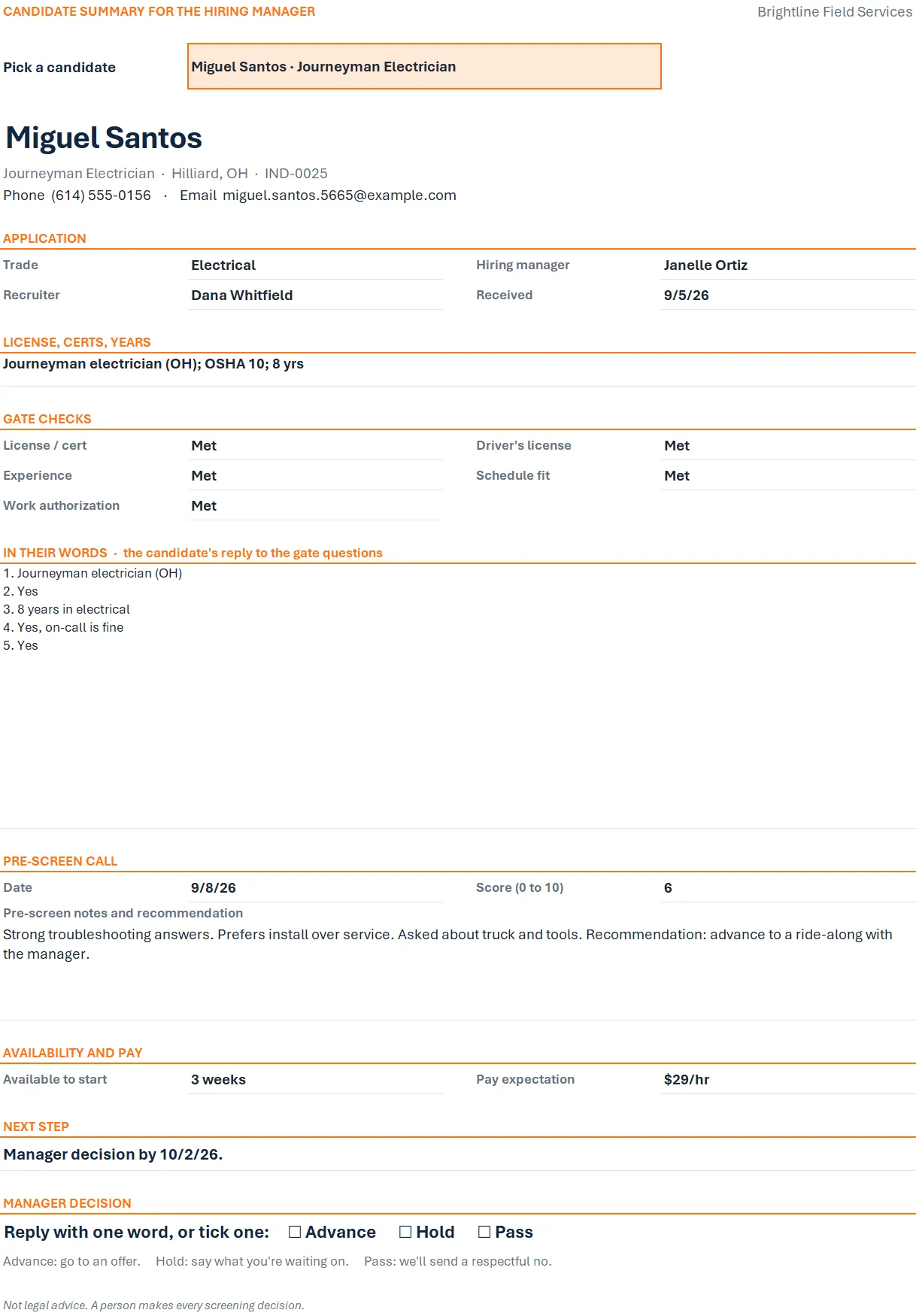
Step 5. A one-page handoff tab holds the applicant's phone, email, and own answers.
You send it as a PDF by email or text, so the hiring manager gets the short version without an Indeed login and can answer with one word: Advance, Hold, or Pass.
The Manager Handoff tab with sample data.
Drawn from the sample data in the file. Each step links to the real screen. Made-up data only, in every file and every image.
What's included
The tracker (also sold on its own):
- Hiring tracker workbook with seven tabs: Start Here, Dashboard, Applicants, Open Roles, Gate Questions, Manager Handoff (one page), and Settings
- A sample-data copy filled with fake applicants to explore first
- A quick-start PDF
The Full Kit adds:
- Two ready-made Power Automate flows to import
- Power Automate setup guide (PDF): the import, then a checklist that points the flows at your tracker and mail folders, with every formula in a text file to copy and paste
- Gate question library for field roles
- Applicant email and text message templates
- Pre-screen call sheet
- Manager handoff form (Word)
Before you buy
The tracker needs:
- Excel for Microsoft 365 (Windows, Mac, or web) or Excel 2021 or newer.
- It does not work in Google Sheets, Apple Numbers, or Excel 2019 and older.
The automation:
- Built for Indeed's application emails as of September 2026. Your Indeed employer account must send an email for each application to a Microsoft 365 work mailbox you sign in to (yours, or a hiring account; a shared mailbox won't work). The guide shows the setting.
- Needs Microsoft 365 Business Basic, Standard, or Premium (or an enterprise plan). Those plans include Outlook, Excel for the web, OneDrive for Business, and Power Automate, which is everything the automation uses, so there's nothing extra to license.
- Does not work with Microsoft 365 Personal, Family, or Apps for business (no work mailbox).
- Setup: you import the two ready-made flows, then follow the guide's checklist to point them at your own tracker and mail folders, including re-entering the column values in each Excel step from the formulas file. It takes about 45 minutes to an hour, once, plus about 15 minutes to test (longer if Microsoft 365 is new to you).
- No business plan? The tracker still works fully by hand, and the templates, call sheet, and handoff work without the automation.
- Delivered as one .zip file. Unzip it first. Digital download; nothing is shipped.
What the automation does
Built and tested in a Microsoft 365 Business Basic account.
- An Indeed application email arrives in Outlook.
- Within a few minutes, a new row appears in your tracker with the applicant's name, the job, their location, and the time it came in.
- Your gate questions go to the applicant by email, and the row records when they went out.
- When the applicant replies, their first reply is saved as text on their row, and anything they send after that is kept in its own column, so their answers are never overwritten. It's matched by the Indeed address it came from, or by name and job title if it comes from an address the tracker hasn't seen.
- Replies it can't match go to a "Needs matching" folder in Outlook for you to place by hand.
- Every email it handles is filed in Outlook. If a new application can't be added, you get an email alert, and a reply it can't place waits in its own folder for you.
What it doesn't do
- It doesn't screen, score, rank, or reject anyone. You read each reply and mark each gate question yourself.
- It doesn't pull resumes out of Indeed. Open resumes in Indeed as you do now.
- It doesn't post jobs. You post on Indeed as usual.
A person makes every decision
This is a workflow and organizing tool, not legal advice. Nothing in it makes advance or reject decisions. The gate questions and templates are editable examples; check your state and local rules before you use them.
Questions
Does the automation screen candidates?
No. It adds the applicant's row, sends your gate questions, and saves the reply as text. It never scores, ranks, advances, or rejects anyone. You read each reply and make every decision.
What do applicants receive?
One email with your gate questions, sent from your Outlook to the applicant's Indeed contact address right after their row is added. You set the wording and sign-off once during setup, starting from the ready-made email in the flow you import.
How are replies matched to the right applicant?
By the Indeed address the message came from (the same one as their application), or by the applicant's name and job title if it comes from an address the tracker hasn't seen. A reply it can't place goes to a "Needs matching" folder in Outlook, and you copy it into their row by hand.
What if Indeed changes its emails?
The automation is built for Indeed's application emails as of September 2026. If a later change stops new rows or replies from coming in, your tracker and everything in it keeps working, and you can add applicants by hand. The setup guide shows which steps read each email.
Which Microsoft 365 plan do I need for the automation?
Business Basic, Standard, or Premium (or an enterprise plan). Personal and Family plans can't run it, because the flows use the business versions of Outlook and Excel, and Apps for business can't either, because it has no Microsoft 365 work mailbox.
How long does setup take?
About 45 minutes to an hour, once, plus about 15 minutes to test, and longer if Microsoft 365 is new to you. You import the two ready-made flows, then work down the guide's checklist: connect your accounts, point the flows at your tracker and mail folders, and re-enter the column values in each Excel step from the formulas file. If the import fails, an appendix builds the same flows by hand. If Import is greyed out, your Microsoft 365 admin has to let you create flows.
How fast do new applicants show up?
Within a few minutes of the application email arriving. It isn't instant.
Do I need Indeed?
For the automatic part, yes: it reads Indeed's application emails. Applicants from referrals, walk-ins, or your website go in by hand, and the tracker handles them the same way.
Does this work in Google Sheets?
No. The tracker needs Excel for Microsoft 365 (Windows, Mac, or web) or Excel 2021 or newer. It does not work in Google Sheets, Apple Numbers, or Excel 2019 and older, and the automation needs a Microsoft 365 business plan.
Does it work on a Mac?
Yes. The tracker works in Excel for Microsoft 365 for Mac or Excel 2021 or newer for Mac. The automation runs in Microsoft's cloud and is set up in a web browser. On a Mac, use Microsoft Edge or Google Chrome for the import step: Microsoft's import needs third-party cookies, which Safari blocks by default.
Do I also need the Tracker?
No. The Full Kit includes the same tracker.
Related tool
Field Tech Hiring System Tracker
The Field Tech Hiring System Tracker is sold separately in our shop for anyone who wants to add applicants by hand. The Full Kit already includes it, so you don't need both.
See this tool$19.00