
Incident Report Pack
Incident report forms in Word and PDF for HVAC, plumbing and electrical service companies.
When someone gets hurt on a job, or nearly does, the right form is ready.
$7.00
Buy nowPay once. No subscription.
If a file won't open, won't work on your computer or Microsoft plan, or isn't what the page described, we fix it or refund you, your choice. Tell us within 14 days of your purchase.
Questions? Email support@tightshiphq.com
- You need Microsoft Word to type into or change the forms (.docx).
- These are internal company forms. They are not OSHA's injury and illness forms (300, 300A and 301).
How you use it
MADE-UP COMPANY: BRIGHTLINE FIELD SERVICES
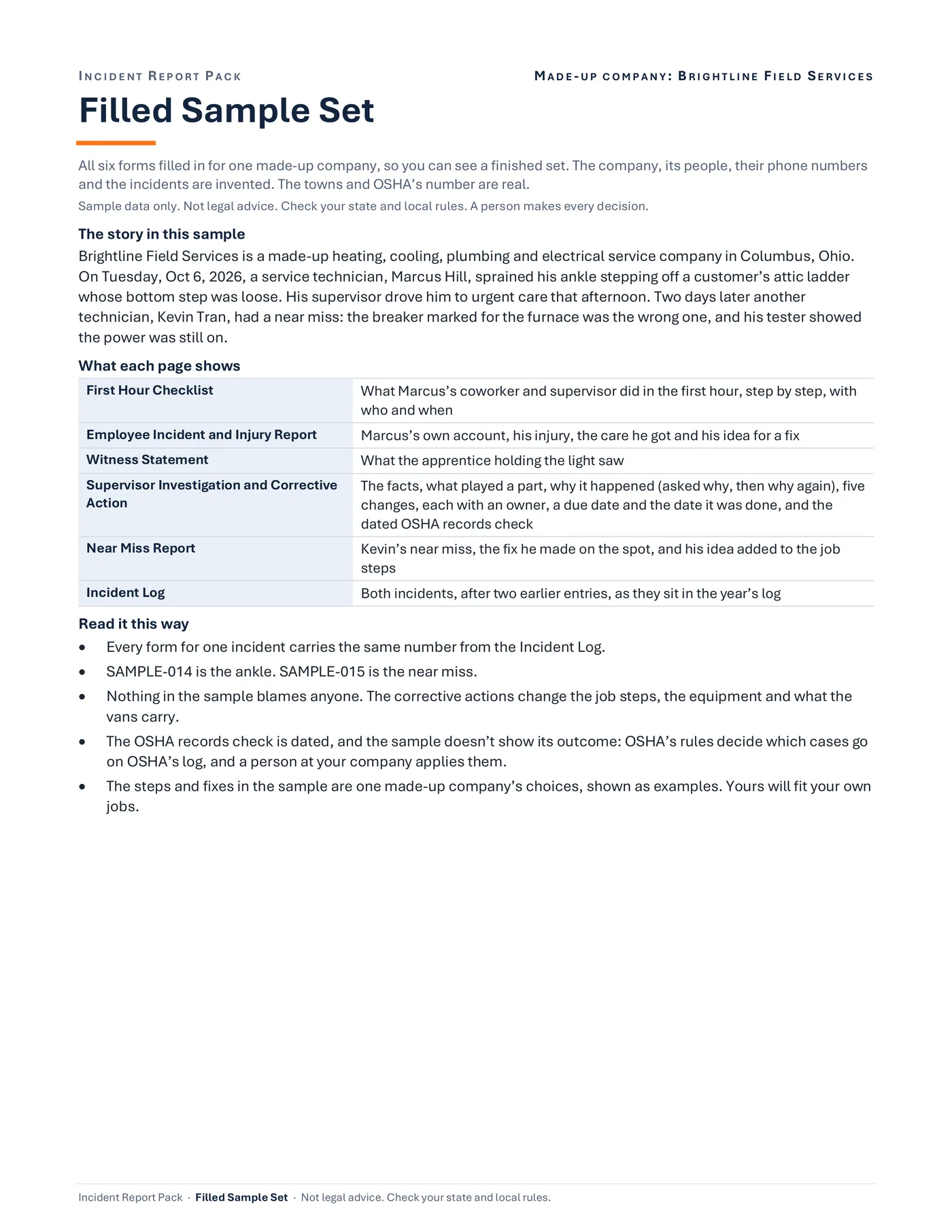
Filled Sample Set
Sample data
What each page shows
- 1First Hour ChecklistWhat Marcus’s coworker and supervisor did in the first hour
- 2Employee Incident and Injury ReportMarcus’s own account, his injury, the care he got and his idea for a fix
- 3Witness StatementWhat the apprentice holding the light saw
- 4Supervisor Investigation and Corrective ActionThe facts, what played a part, why it happened
- 5Near Miss ReportKevin’s near miss, the fix he made on the spot
- 6Incident LogBoth incidents, after two earlier entries
Step 1. Unzip the download.
Open the Quick Start PDF, then the filled sample set.
A filled sample set (PDF, 9 pages): all six forms filled in for one made-up company, so you can see a finished set.
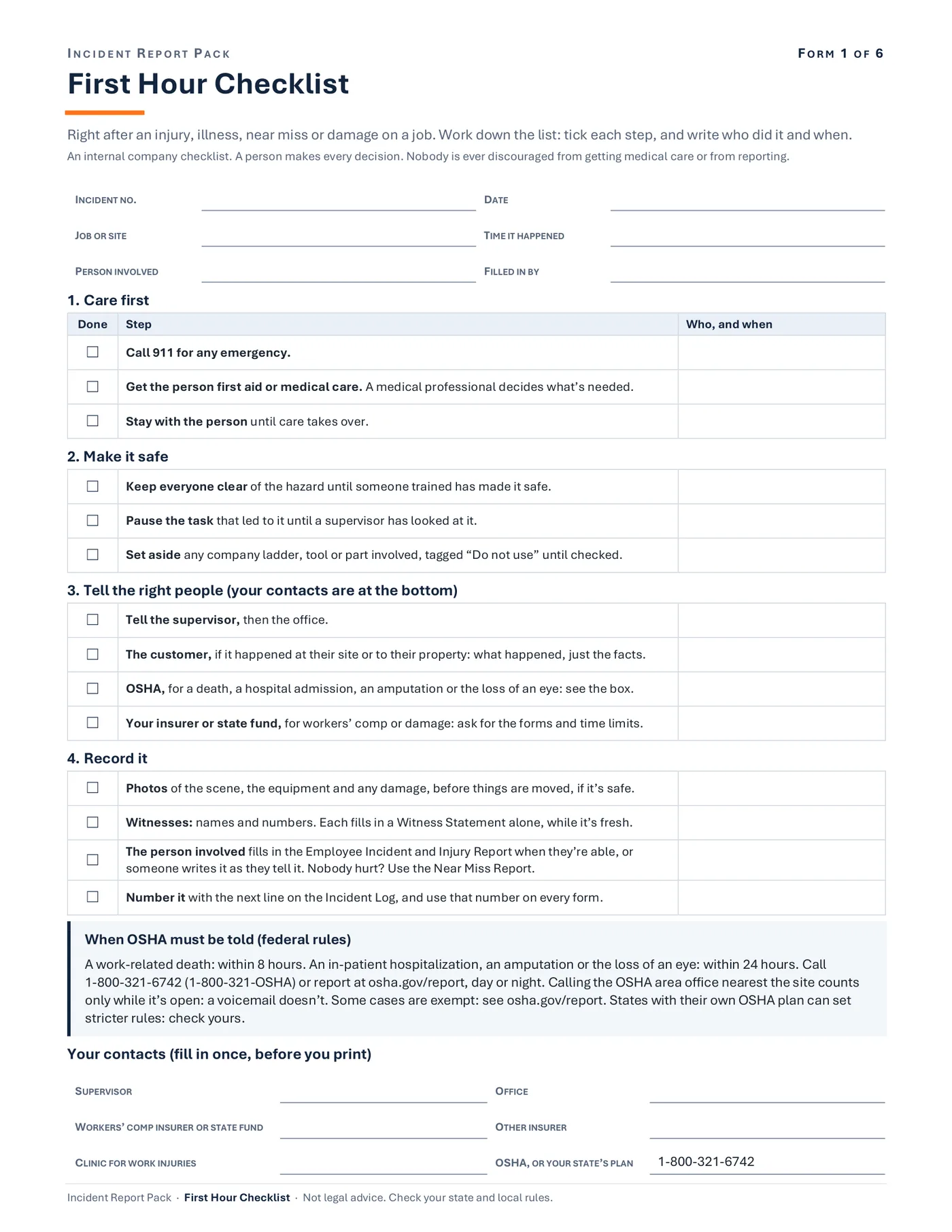
First Hour Checklist
Sample data
Your contacts (fill in once, before you print)
- SUPERVISOR
- OFFICE
- WORKERS’ COMP INSURER OR STATE FUND
- OTHER INSURER
- CLINIC FOR WORK INJURIES
- OSHA, OR YOUR STATE’S PLAN
- 1-800-321-6742
Step 2. Type your contacts into the First Hour Checklist once.
That's your supervisor, office, insurer or state fund, and clinic. Type where near miss reports go into the Near Miss Report, then print copies for each van and the office.
First Hour Checklist (1 page): 14 steps in order, from care first to who to call and what to record, with a box on when OSHA must be told and a place for your own contacts.
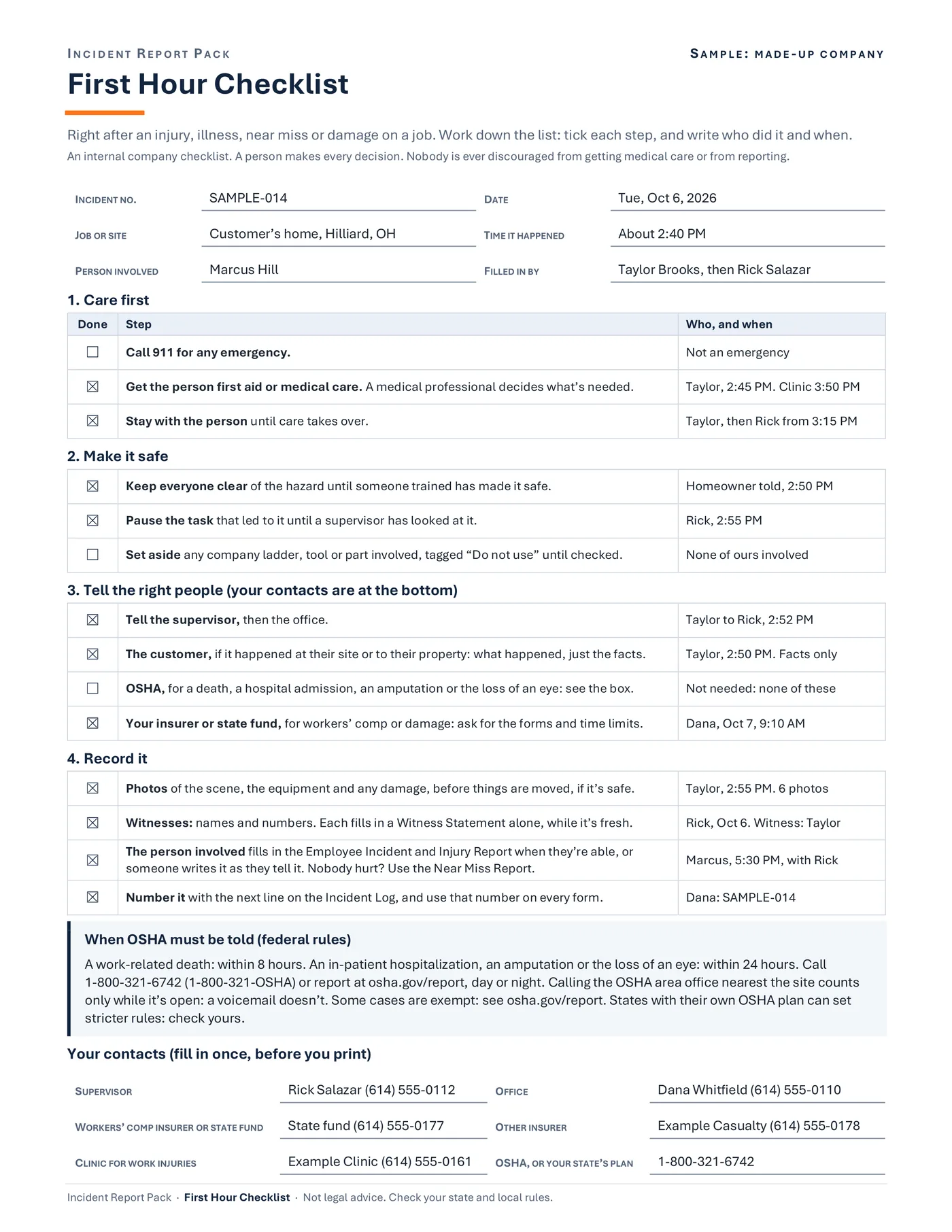
SAMPLE: MADE-UP COMPANY
First Hour Checklist
Sample data
- INCIDENT NO.
- SAMPLE-014
- DATE
- Tue, Oct 6, 2026
1. Care first
- Call 911 for any emergency.Not an emergency
- Get the person first aid or medical care.Taylor, 2:45 PM. Clinic 3:50 PM
- Stay with the person until care takes over.Taylor, then Rick from 3:15 PM
2. Make it safe
- Keep everyone clear of the hazard until someone trained has made it safe.Homeowner told, 2:50 PM
Step 3. When something happens: the First Hour Checklist first.
Then the employee's report and the witness statements the same day, or as soon as an injury is noticed. Then the supervisor's investigation within a few days. Nobody hurt? Use the Near Miss Report.
The First Hour Checklist, filled in for a made-up company: 14 steps from care first to who to call and what to record, who did each one and when, and a box on when OSHA must be told.
SAMPLE: MADE-UP COMPANY
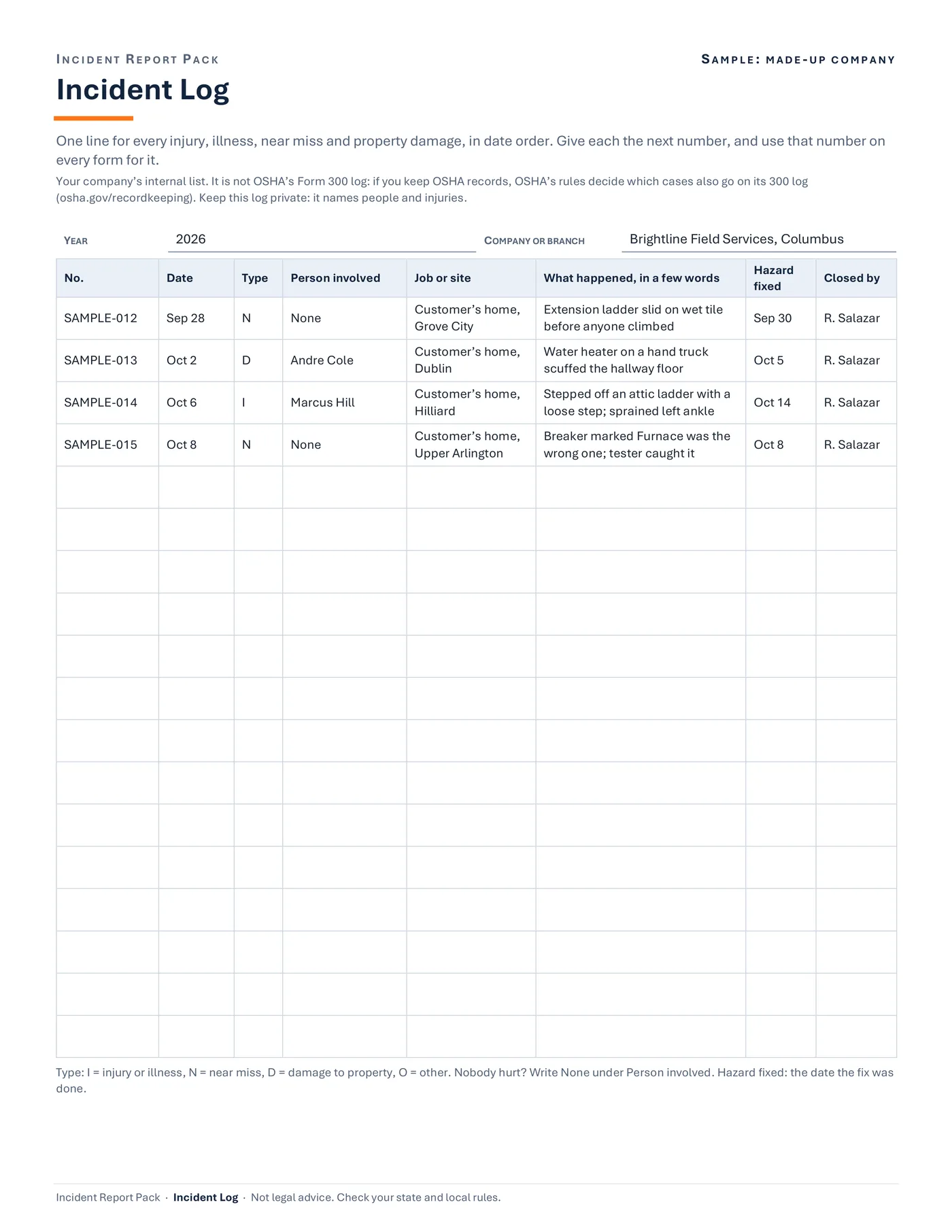
Incident Log
Sample data
- YEAR
- 2026
- COMPANY OR BRANCH
- Brightline Field Services, Columbus
No. Date Type Person involved What happened, in a few words SAMPLE-012 Sep 28 N None Extension ladder slid on wet tile before anyone climbed SAMPLE-013 Oct 2 D Andre Cole Water heater on a hand truck scuffed the hallway floor SAMPLE-014 Oct 6 I Marcus Hill Stepped off an attic ladder with a loose step; sprained left ankle SAMPLE-015 Oct 8 N None Breaker marked Furnace was the wrong one; tester caught it Step 4. Give each incident the next number on the Incident Log.
Use that number on every form for it.
The Incident Log, sample: one numbered line for each injury, near miss or property damage, with the date, type, person, job, what happened, the date the hazard was fixed and who closed it.
Drawn from the sample data in the file. Each step links to the real screen. Made-up data only, in every file and every image.
What's included
- 6 forms in Word (.docx), to type into or to change before you print
- The same 6 forms as print-ready PDFs, to fill in by hand
- A filled sample set (PDF, 9 pages): all six forms filled in for one made-up company, so you can see a finished set
- A one-page Quick Start PDF and a start-here text file
Before you buy
- You need Microsoft Word to type into or change the forms (.docx). Checked in Word for Microsoft 365 on Windows.
- A PDF reader and a printer for the print-ready PDFs. Letter size (8.5 x 11 in).
- Not tested yet in Word for Mac, Word for the web, or Word 2021 and older. Not tested in Google Docs, Apple Pages or LibreOffice: they may open the files, but the layout can shift.
- The PDFs are for printing. They aren't fillable on screen: to type, use the Word files.
- No macros. Plain Word files.
- These are internal company forms. They are not OSHA's injury and illness forms (300, 300A and 301), a workers' compensation claim form, or a first report of injury. OSHA's own forms are free at osha.gov.
- Delivered as one .zip file. Unzip it first. Digital download; nothing is shipped.
A person makes every decision
These are workflow and organizing forms, not legal advice. They don't decide whether a case must be recorded or reported to anyone: OSHA's rules and your state's do. The First Hour Checklist names the events federal rules say go to OSHA within hours, and says states with their own OSHA plan can be stricter. Check your state and local rules.
Questions
Are these OSHA forms?
No. They are your company's internal records. Many employers with more than 10 employees must keep OSHA's Forms 300, 300A and 301. They're free at osha.gov/recordkeeping, and OSHA's rules decide which cases go on them.
Why is there no drug-test box?
Whether to test after an incident is your company's policy, not a form's. OSHA says it breaks its rule to test as a way to penalize someone for reporting an injury (its memo of Oct 11, 2018). Check federal and state rules before you set a policy.
Can I change the forms?
Yes. Every Word file can be edited: put your company name at the top, change a question, or add a step that fits your jobs.
Are the PDFs fillable?
No. They're for printing and filling in by hand. To type, use the Word files.
Does it work in Google Docs or on a Mac?
It's made for Microsoft Word. We haven't tested Google Docs, Apple Pages, LibreOffice or Word for Mac: they may open the files, but the layout can shift.