
Invoice and Payment Tracker
Invoice tracker in Excel for HVAC, plumbing, electrical and other service companies.
Type in each invoice and payment. It works out every balance and how late it is, and lists who to call today.
$12.00
Buy nowPay once. No subscription.
If a file won't open, won't work on your computer or Microsoft plan, or isn't what the page described, we fix it or refund you, your choice. Tell us within 14 days of your purchase.
Questions? Email support@tightshiphq.com
- Made for Excel, not Google Sheets.
- It tracks invoices; it doesn't make them.
How you use it
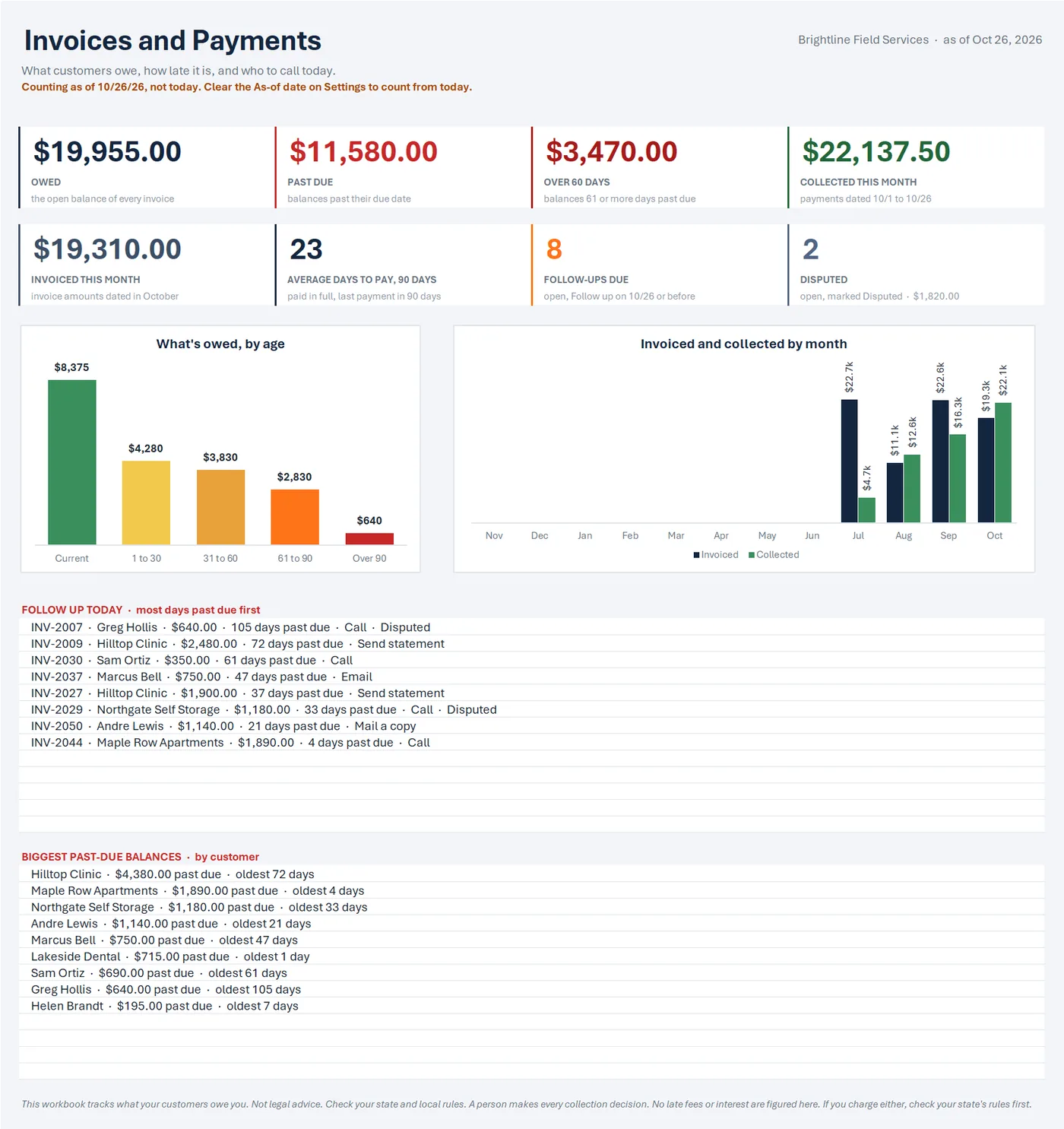
- $19,955.00OWED
Sample data
What's owed, by age
Step 1. Open the sample-data copy first.
It shows how it all fits together.
A sample-data copy filled with a made-up company's books (25 customers, 60 invoices, 68 payments), so you can click around before adding your own.
Settings
Sample data
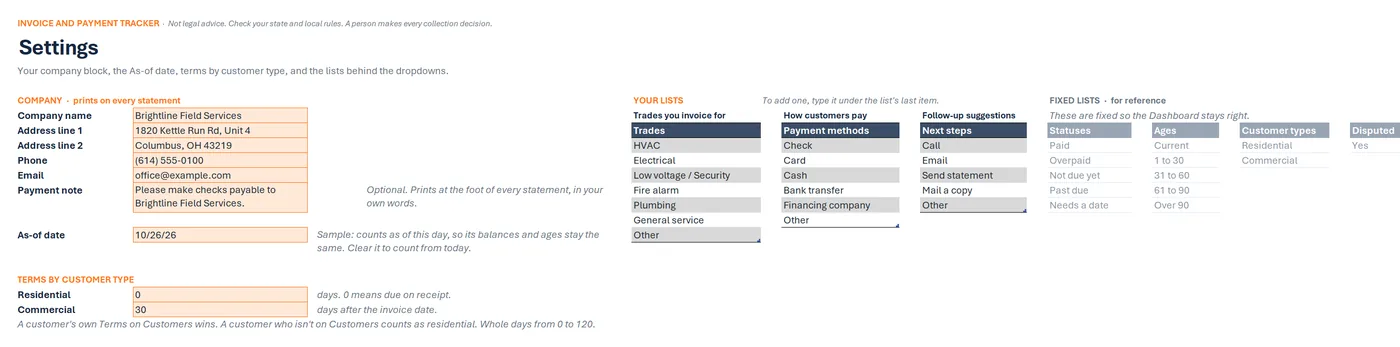
COMPANY · prints on every statement
- Company name
- Brightline Field Services
- Address line 1
- 1820 Kettle Run Rd, Unit 4
- Address line 2
- Columbus, OH 43219
- Phone
- (614) 555-0100
- Payment note
- Please make checks payable to Brightline Field Services.
TERMS BY CUSTOMER TYPE
- Residential
- 0 days
- Commercial
- 30 days
Step 2. Save the blank tracker where you keep your work files.
On its Settings tab, type your company details, check the terms, and add your payment note.
Settings tab in Excel: the company block that prints on statements, the As-of date, and payment terms by customer type (residential due on receipt, commercial net 30). No late fees or interest are figured.
Customers
Sample data
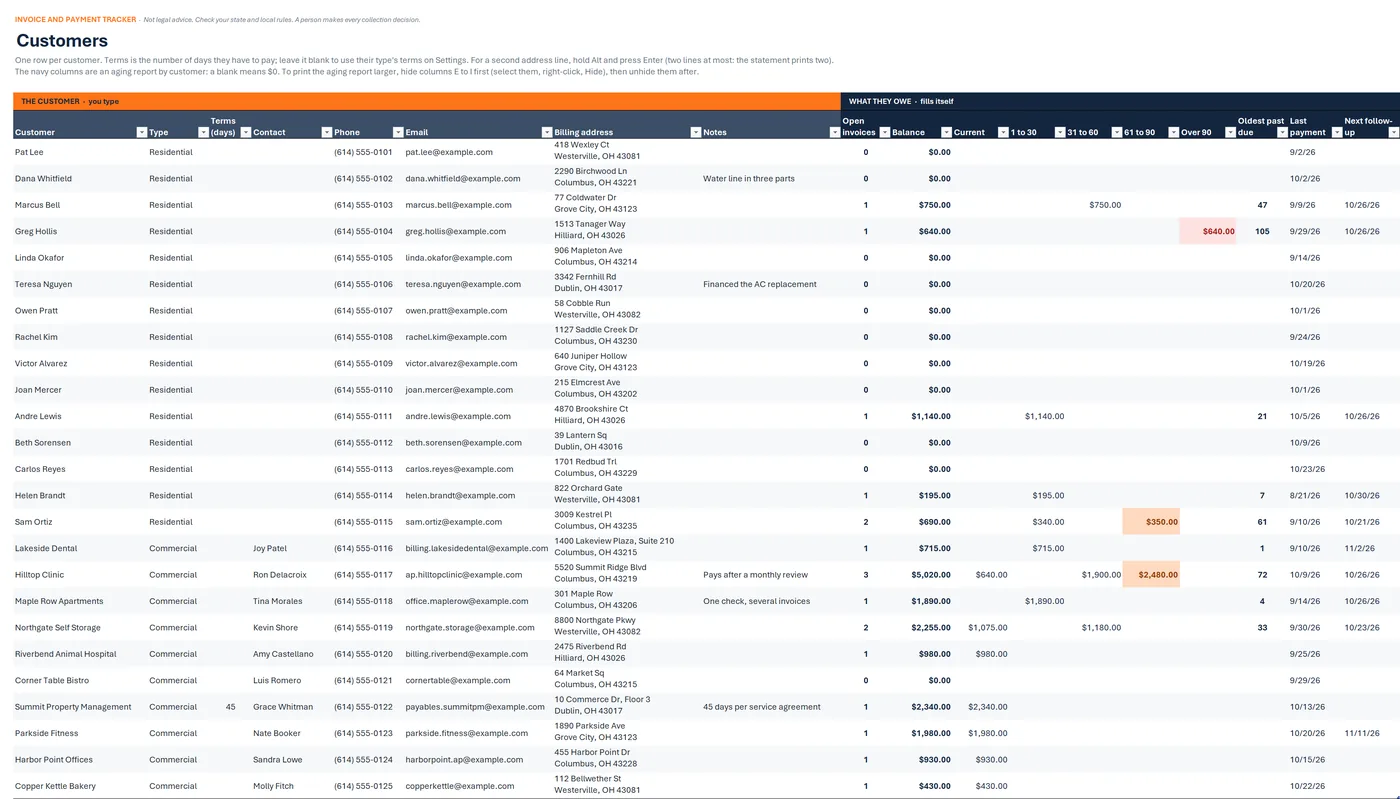
Customer Type Open invoices Balance Marcus Bell Residential 1 $750.00 Greg Hollis Residential 1 $640.00 Andre Lewis Residential 1 $1,140.00 Lakeside Dental Commercial 1 $715.00 Hilltop Clinic Commercial 3 $5,020.00 Maple Row Apartments Commercial 1 $1,890.00 Step 3. Add your customers on the Customers tab.
Customers tab in Excel: each customer's type and terms, then open invoices, balance, the balance split into Current, 1 to 30, 31 to 60, 61 to 90 and Over 90 days, and the last payment. Made-up sample data.
Invoices
Sample data
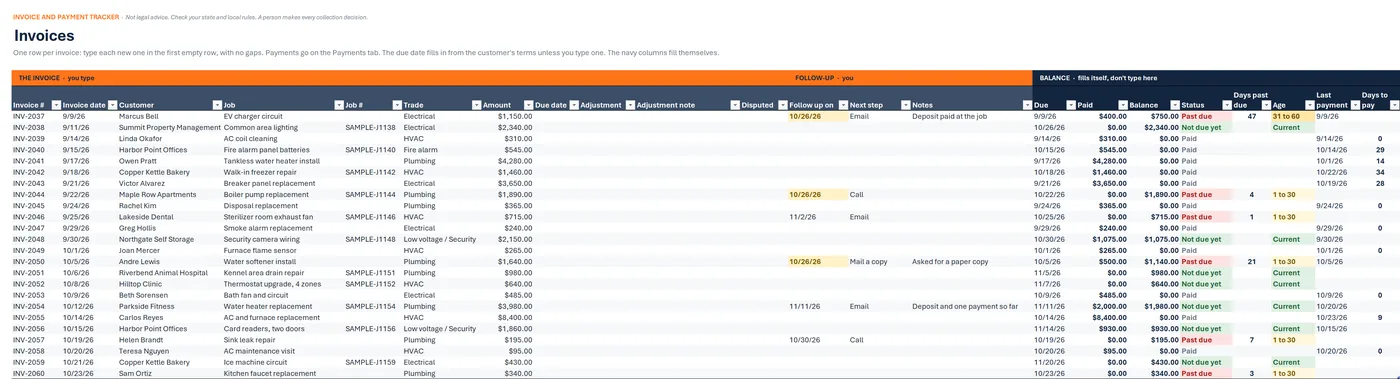
Invoice # Customer Amount Status INV-2043 Victor Alvarez $3,650.00 Paid INV-2044 Maple Row Apartments $1,890.00 Past due INV-2045 Rachel Kim $365.00 Paid INV-2046 Lakeside Dental $715.00 Past due INV-2047 Greg Hollis $240.00 Paid INV-2048 Northgate Self Storage $2,150.00 Not due yet Step 4. Each invoice you send: one row on Invoices.
Invoices tab in Excel: each invoice's number, date, customer, job and amount, then the due date, paid, balance, status, days past due and age that fill in from payments and terms. Made-up sample data.
Payments
Sample data
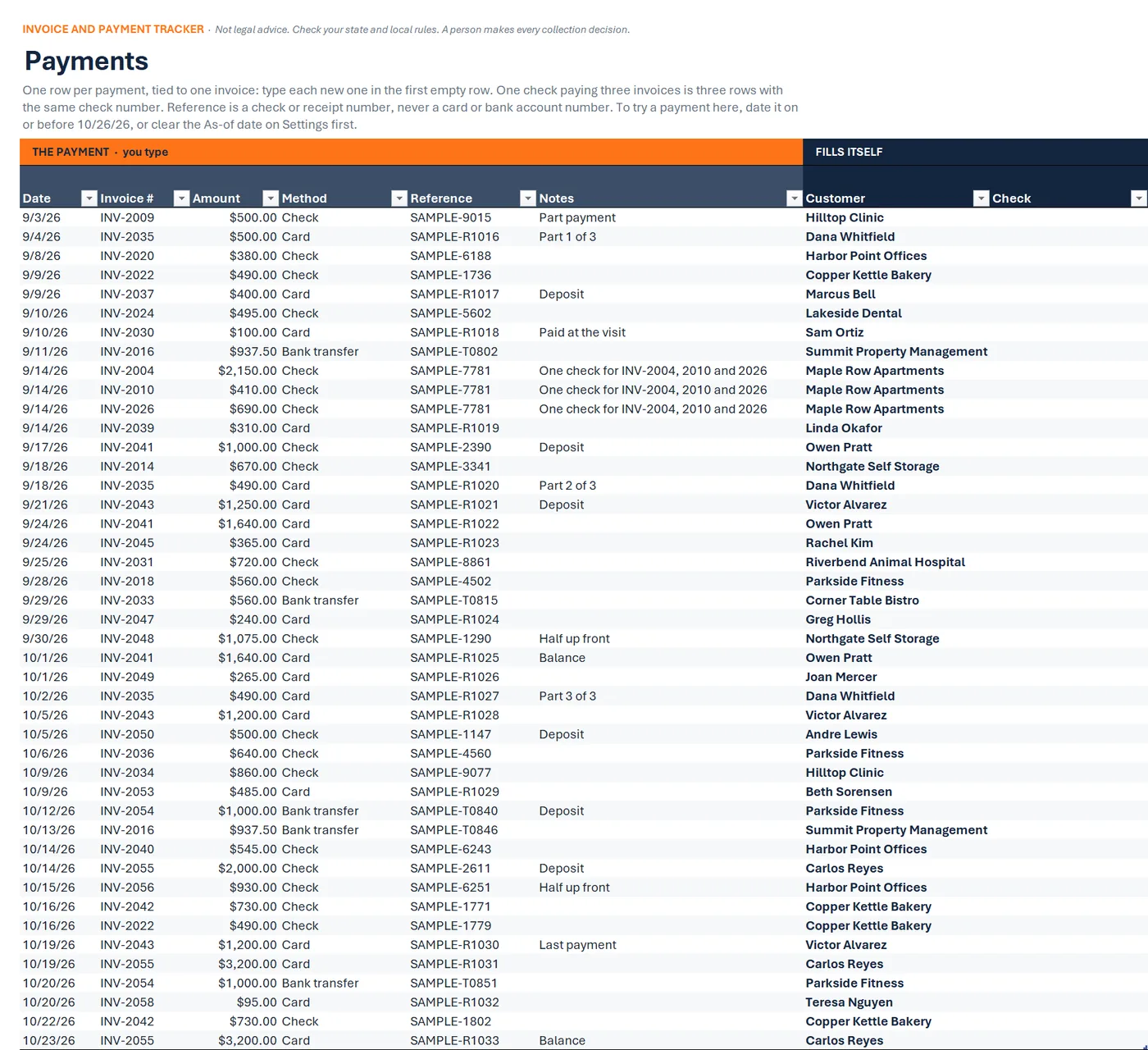
Date Invoice # Amount Method Reference 9/11/26 INV-2016 $937.50 Bank transfer SAMPLE-T0802 9/14/26 INV-2004 $2,150.00 Check SAMPLE-7781 9/14/26 INV-2010 $410.00 Check SAMPLE-7781 9/14/26 INV-2026 $690.00 Check SAMPLE-7781 9/14/26 INV-2039 $310.00 Card SAMPLE-R1019 One check for INV-2004, 2010 and 2026
Step 5. Each payment: one row on Payments.
Payments tab in Excel: one row per payment with date, invoice number, amount, method, a SAMPLE reference and notes, including one check split across three invoices; the customer and a check column fill in.
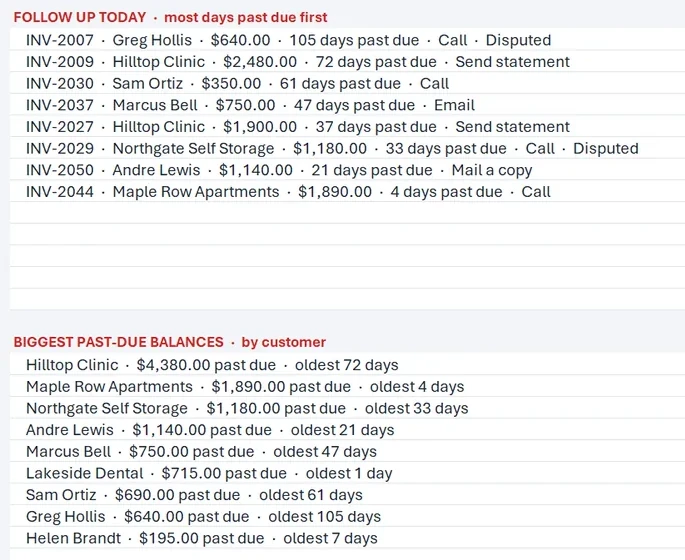
FOLLOW UP TODAY · most days past due first
Sample data
INV-2007 Greg Hollis $640.00 105 days past due Call INV-2009 Hilltop Clinic $2,480.00 72 days past due Send statement INV-2030 Sam Ortiz $350.00 61 days past due Call INV-2037 Marcus Bell $750.00 47 days past due Email INV-2027 Hilltop Clinic $1,900.00 37 days past due Send statement INV-2050 Andre Lewis $1,140.00 21 days past due Mail a copy Step 6. Every morning, open the Dashboard and work the follow-up list.
To send a customer their open invoices, use the Statement.
Open the Dashboard each morning: its follow-up list shows the invoices you've set to follow up on, most days past due first, and the biggest past-due balances by customer.
Drawn from the sample data in the file. Each step links to the real screen. Made-up data only, in every file and every image.
What's included
- Invoice and payment workbook, blank and ready to use, with seven tabs: Start Here, Dashboard, Invoices, Payments, Customers, Statement, and Settings
- A sample-data copy filled with a made-up company's books (25 customers, 60 invoices, 68 payments), so you can click around before adding your own
- A one-page quick-start PDF
- A start-here text file
Before you buy
- Needs Excel for Microsoft 365 or Excel 2021 or newer. Checked in desktop Excel for Microsoft 365 on Windows.
- Not tested yet in Excel for the web or Excel for Mac.
- Not for Google Sheets, Apple Numbers, or Excel 2019 and older.
- It tracks invoices; it doesn't make them. You keep billing the way you do now and type each invoice in.
- Nothing is sent: no invoices, statements or reminders are emailed or texted. The workbook shows what's due when you open it.
- No late fees or interest are figured. If you charge either, check your state's rules first.
- Not bookkeeping or accounting software: no taxes, no bank or app connection.
- Delivered as one .zip file. Unzip it first, then open the Quick Start PDF.
- Digital download. Nothing is shipped.
A person makes every decision
This is a workflow and organizing tool for what your customers owe you. It figures no late fees or interest, sends nothing, and decides nothing: you decide who to call and what to do. Not legal advice. Check your state and local rules.
Questions
Does it send invoices or reminders?
No. Nothing is emailed or texted. Open the Dashboard each morning: its follow-up list shows the invoices you've set to follow up on, most days past due first, and the biggest past-due balances by customer.
Does it add late fees or interest?
No. Nothing in the workbook figures a fee or interest. If you charge either, check your state's rules first.
Can a customer pay an invoice in parts?
Yes. Each payment is its own row on the Payments tab, tied to the invoice number, and the invoice's Paid adds them up. One check that pays three invoices is three rows with the same check number.
Can I print a statement for a customer?
Yes. On the Statement tab, pick the customer: their open invoices fill one page, oldest first, with the total due, what's owed by age, and payments from the last 30 days. Hold Ctrl and press P, or save it as a PDF. It shows facts only, plus your own payment note.
Does it work on a Mac or in Excel for the web?
Not tested yet. We've checked it in desktop Excel for Microsoft 365 on Windows. It uses no macros and only functions Excel 2021 has, but we haven't opened it in Excel for Mac or Excel for the web.