
Field Tech Hiring System Job Descriptions
Job description templates in Word for HVAC, electrical, plumbing and other service companies that hire field techs.
Nine trade roles, each a two-page job description plus a one-page short job post to copy into Indeed or any job board.
$15.00
Buy nowPay once. No subscription.
If a file won't open, won't work on your computer or Microsoft plan, or isn't what the page described, we fix it or refund you, your choice. Tell us within 14 days of your purchase.
Questions? Email support@tightshiphq.com
- You need Microsoft Word to edit the files (.docx).
- You set the pay range and overtime status yourself.
How you use it
Example (fake data)
HVAC Service Technician
Sample data
- Posting title
- [HVAC Service Technician]
- Trade
- HVAC
- Location / branch
- [Columbus, OH]
- Openings
- [2]
- Pay range
- [$28 to $38/hr]
- Hiring manager
- [Rick Salazar]
- Required license or cert
- [EPA 608 Universal]
- Minimum years
- [3]
- Drives company vehicle
- [Yes]
- Schedule notes
- [On-call 1 week in 4]
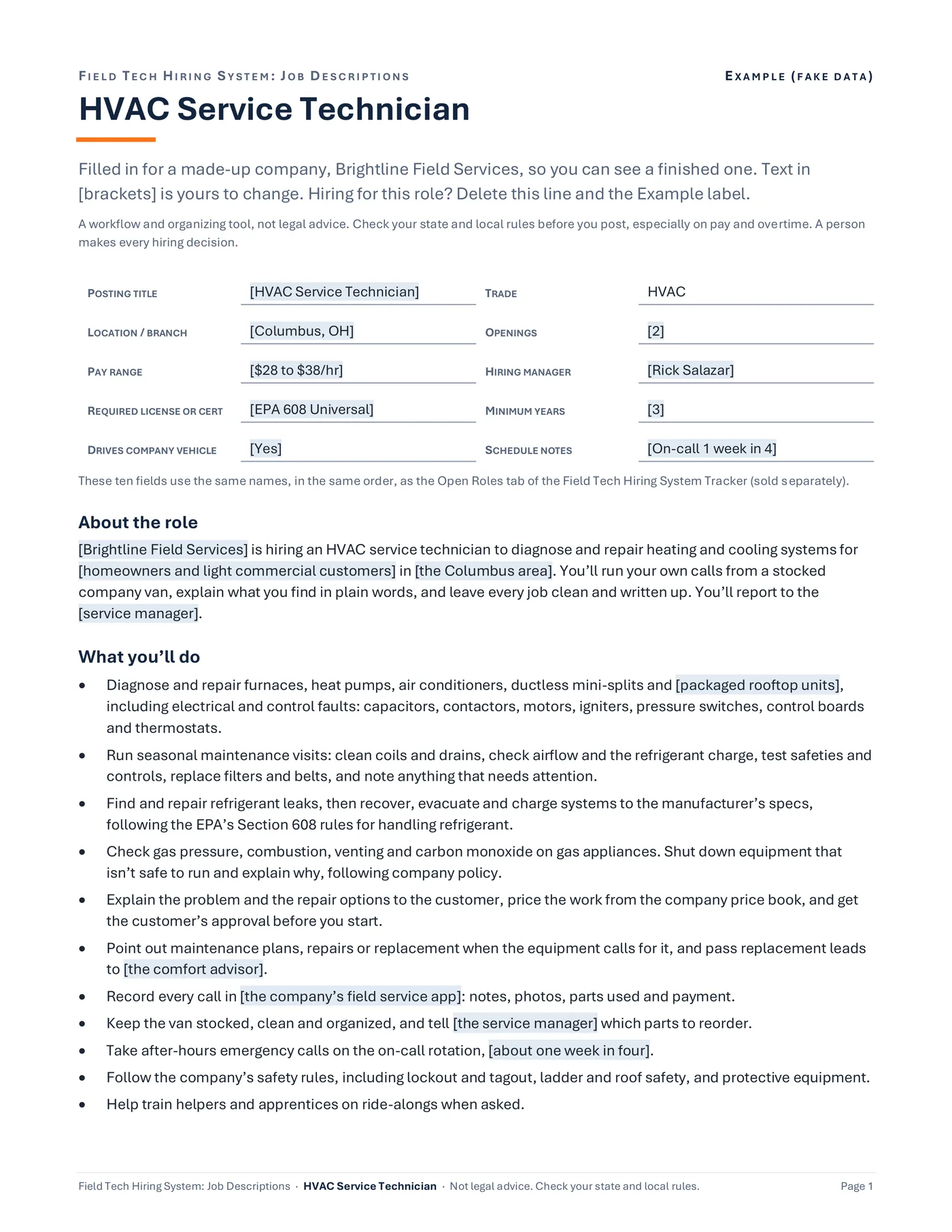
Step 1. Open HVAC Service Technician first to see a finished one.
The filled example, HVAC Service Technician in Word, page 1: the ten header fields and About the role, for a made-up company.
Job description
Service Electrician
Sample data
About the role
[Company name] is hiring a service electrician to troubleshoot, repair and upgrade electrical systems
What you’ll do
- Troubleshoot and repair circuits, breakers, panels, receptacles, switches, lighting
- Replace panels and upgrade services
- Read wiring diagrams, panel schedules and plans when the job has them.
Must-haves (the five gate checks)
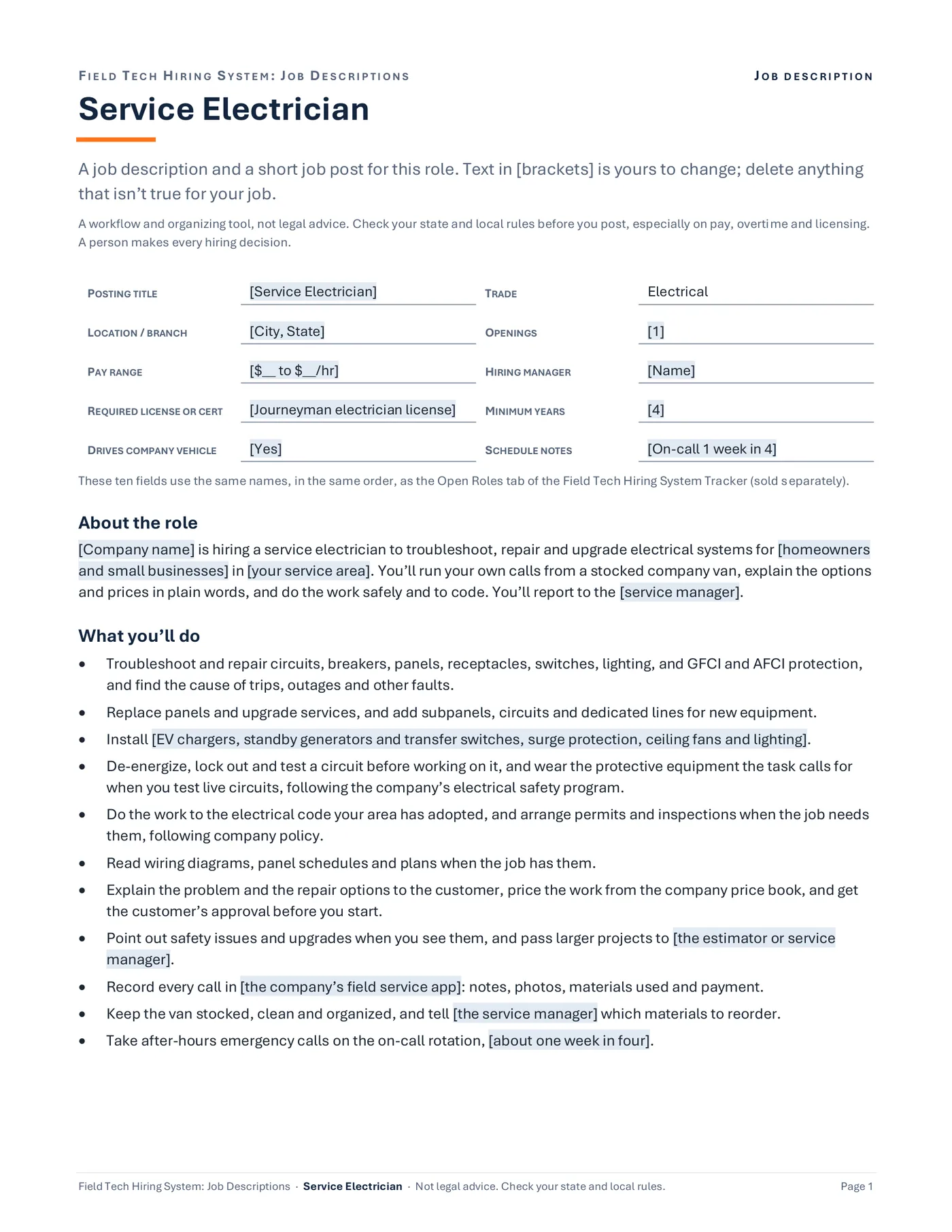
Step 2. Open the file for the role you're hiring.
Save a copy for that job first (File, Save As, or File, Save a Copy if AutoSave is on).
Page 1 of the Service Electrician file: ten fields at the top, About the role, then the duties.
Job description
Service Electrician
Sample data
- Posting title
- [Service Electrician]
- Location / branch
- [City, State]
- Pay range
- [$__ to $__/hr]
- Hiring manager
- [Name]
- Required license or cert
- [Journeyman electrician license]
- Minimum years
- [4]
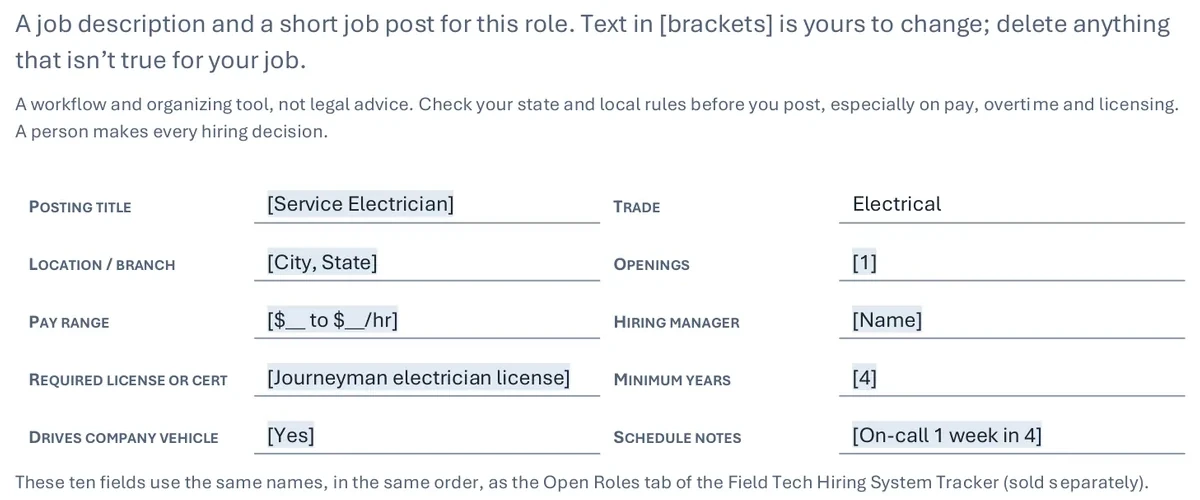
Step 3. Type over everything in [brackets].
That runs from the ten fields at the top to the short job post. Delete anything that isn't true for your job.
The ten fields at the top of the Service Electrician file: the title, city, pay range, hiring manager and more are in [brackets] for you to type over.
Example (fake data)
HVAC Service Technician
Sample data
Must-haves (the five gate checks)
- 1License or cert[EPA Section 608 Universal certification]
- 2Driver’s licenseA valid driver’s license
- 3Experience[3]+ years of hands-on HVAC service and repair
- 4Schedule fit[Full time, Monday to Friday, 7:30 a.m. to 4:30 p.m.]
- 5Work authorizationLegally authorized to work in the United States
Pay, schedule and benefits
- Overtime status
- [Exempt or non-exempt: set this with your payroll provider or HR advisor]
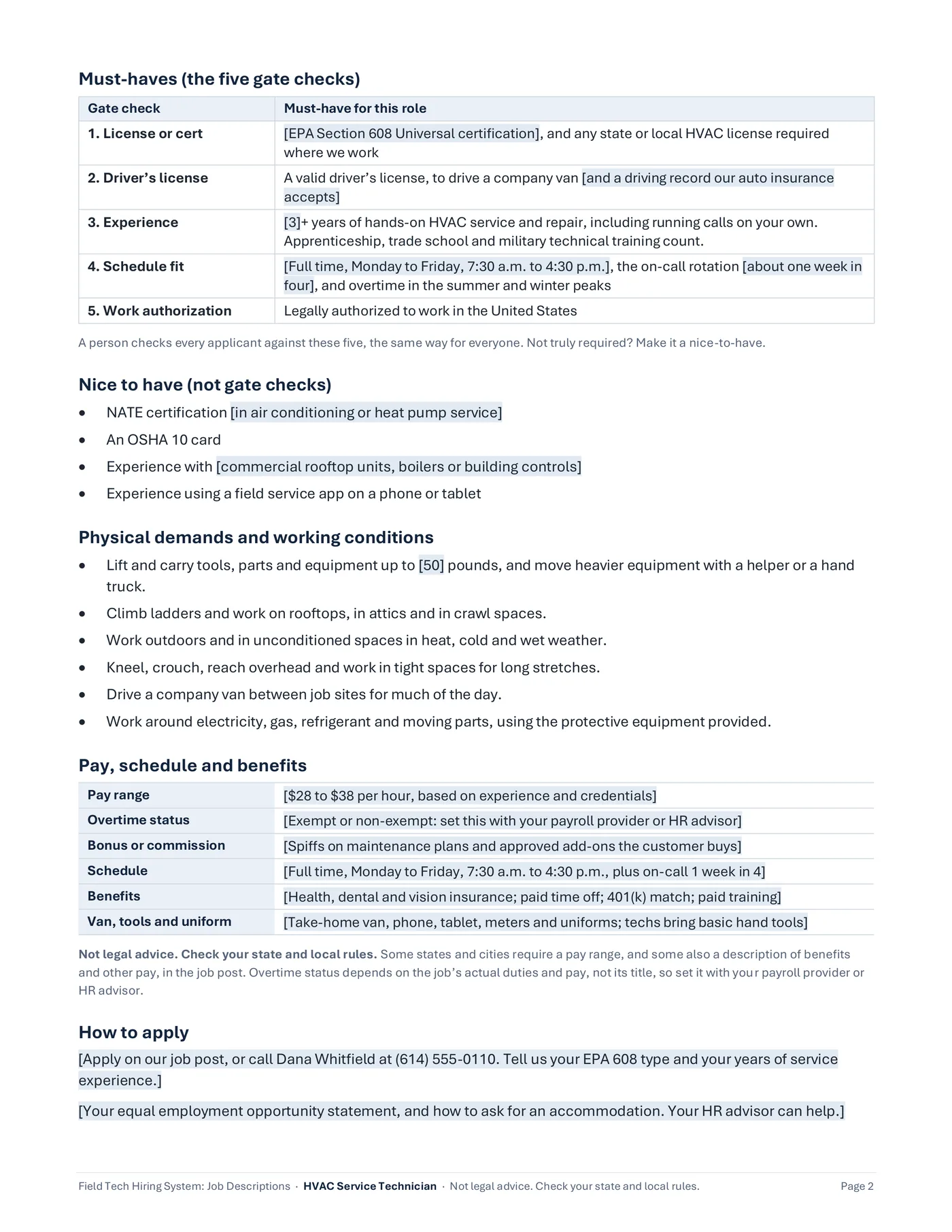
Step 4. Set the pay range and overtime status.
Check both with your payroll provider or HR advisor.
Page 2 of the example: must-haves as five gate checks, then pay, schedule and benefits, with overtime status left for you to set. Not legal advice.
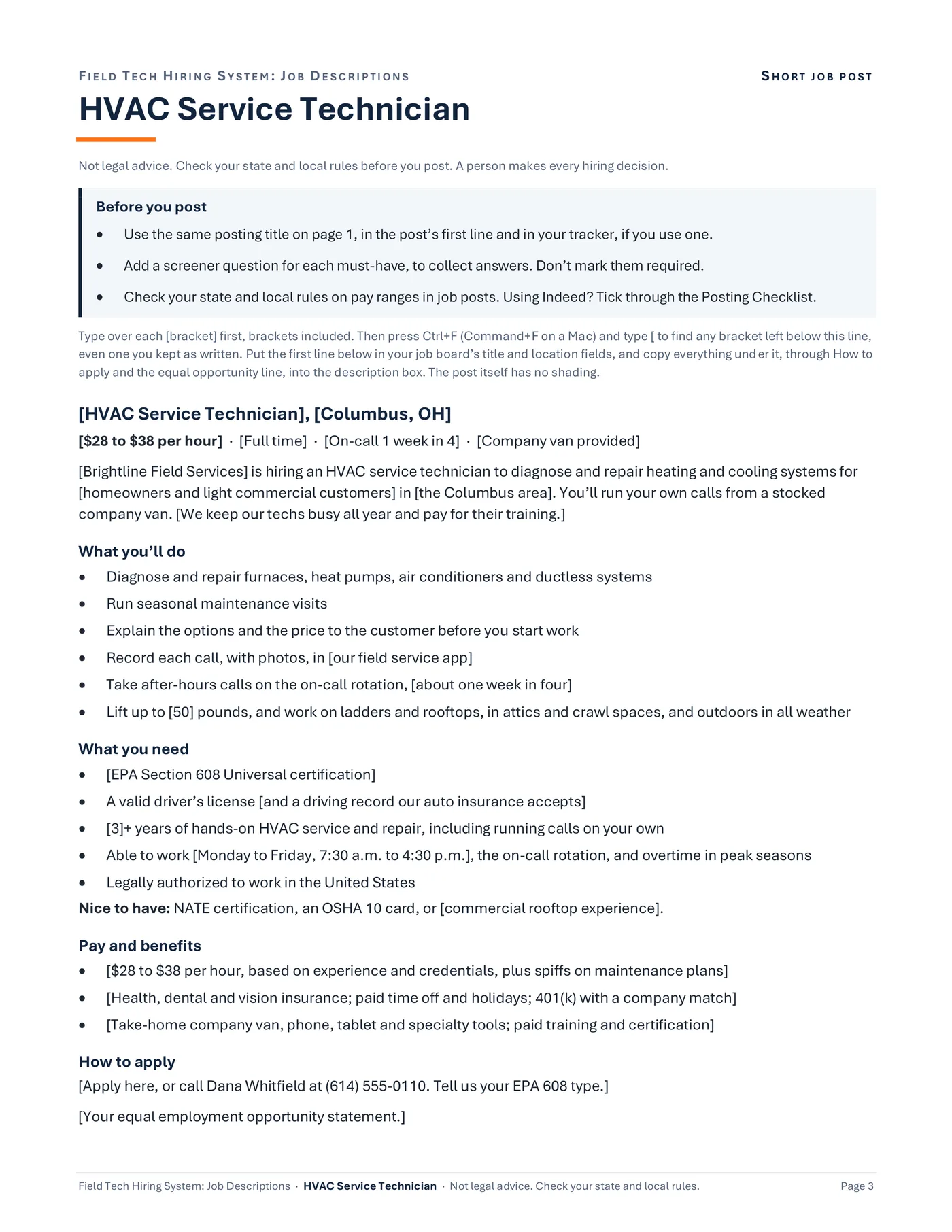
Short job post
[HVAC Service Technician], [Columbus, OH]
Sample data
[$28 to $38 per hour] · [Full time] · [On-call 1 week in 4] · [Company van provided]
What you’ll do
- Diagnose and repair furnaces, heat pumps, air conditioners and ductless systems
- Run seasonal maintenance visits
What you need
- [EPA Section 608 Universal certification]
- A valid driver’s license [and a driving record our auto insurance accepts]
Pay and benefits
- [$28 to $38 per hour, based on experience and credentials, plus spiffs on maintenance plans]
How to apply
- [Apply here, or call Dana Whitfield at (614) 555-0110. Tell us your EPA 608 type.]
Step 5. Copy the short job post into Indeed or any job board.
Add a screener question for each must-have, left optional, and read the answers yourself.
The short job post on the last page of every role: title, pay and schedule up top, duties, must-haves, pay and benefits, and how to apply.
Short job post
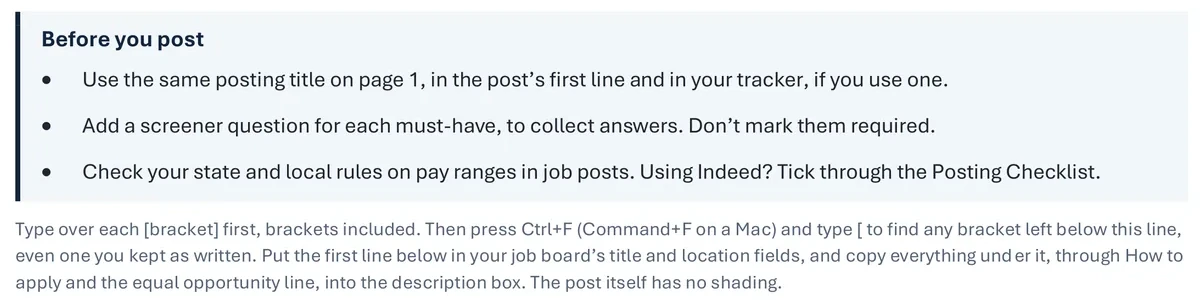
Before you post
Sample data
- Use the same posting title on page 1, in the post’s first line and in your tracker, if you use one.
- Add a screener question for each must-have, to collect answers. Don’t mark them required.
- Check your state and local rules on pay ranges in job posts. Using Indeed? Tick through the Posting Checklist.
Step 6. Posting on Indeed? Tick through the Posting Checklist.
Do it before the job goes live.
The Before you post box at the top of the short job post page: three checks for you, kept out of the post.
Drawn from the sample data in the file. Each step links to the real screen. Made-up data only, in every file and every image.
What's included
- 9 job descriptions in Word (.docx), one file per role, each ending in a one-page short job post: HVAC Service Technician, HVAC Install Technician, Apprentice or Helper, Service Electrician, Service Plumber, Low Voltage and Security Technician, Fire Alarm Inspection Technician, Service Manager, and Dispatcher or CSR
- HVAC Service Technician comes filled in for a made-up company, so you can see a finished one. Its company details are still in [brackets] to type over.
- A one-page Posting Checklist in Word, with boxes to tick: checks before you post, then, if you track applicants from Indeed's emails, the job settings that decide whether every application reaches you, and a weekly check. It follows Indeed's employer help pages as read in October 2026.
- A blank job description template in Word, in the same layout, with a how-to page, for any other job
- A one-page Quick Start PDF and a start-here text file
Before you buy
- You need Microsoft Word to edit the files (.docx). Checked in Word for Microsoft 365 on Windows.
- A PDF reader opens the one-page Quick Start.
- Not tested yet in Word for Mac, Word for the web, or Word 2021 and older.
- Not tested in Google Docs, Apple Pages, or LibreOffice. They may open the files, but the layout can shift.
- No macros. Plain Word files.
- You set the pay range and overtime status yourself. The files don't decide either one.
- Delivered as one .zip file. Unzip it first. Digital download; nothing is shipped.
A person makes every decision
These are workflow and organizing templates, not legal advice. Nothing in them screens, scores, or rejects anyone: a person checks every applicant against the same must-haves. The files make no call on overtime status (exempt or non-exempt) and name no state's rules. Some states and cities require a pay range, and some also a description of benefits and other pay, in the job post. Check your state and local rules.
Questions
Does it post the job for me?
No. The short job post is text you copy and paste into Indeed or any job board. Nothing in the pack connects to a job board.
Does this work in Google Docs?
It's made for Microsoft Word. We haven't tested the files in Google Docs, Apple Pages, or LibreOffice: they may open, but the layout can shift.
Does it work on a Mac?
The files are standard Word .docx files, checked in Word for Microsoft 365 on Windows. We haven't tested Word for Mac yet.
Can I change the duties and must-haves?
Yes. Everything is editable. The duties are written at a general level for each role, so read them and change anything that doesn't match how your company works.
Do I need the Tracker?
No. The job descriptions work on their own. If you use the Tracker, the ten fields at the top of each role file use the same names, in the same order, as its Open Roles tab.
Related tool
Field Tech Hiring System Tracker
If you use the Tracker, the ten fields at the top of each role file use the same names, in the same order, as its Open Roles tab.
See this tool$19.00