
Field Tech Hiring System Tracker
A hiring tracker in Excel for companies that hire field techs.
Every applicant in one place, from application to manager handoff. You type them in by hand.
$19.00
Buy nowPay once. No subscription.
If a file won't open, won't work on your computer or Microsoft plan, or isn't what the page described, we fix it or refund you, your choice. Tell us within 14 days of your purchase.
Questions? Email support@tightshiphq.com
- Works in Excel, not Google Sheets.
How you use it
- 5OPEN ROLES
Sample data
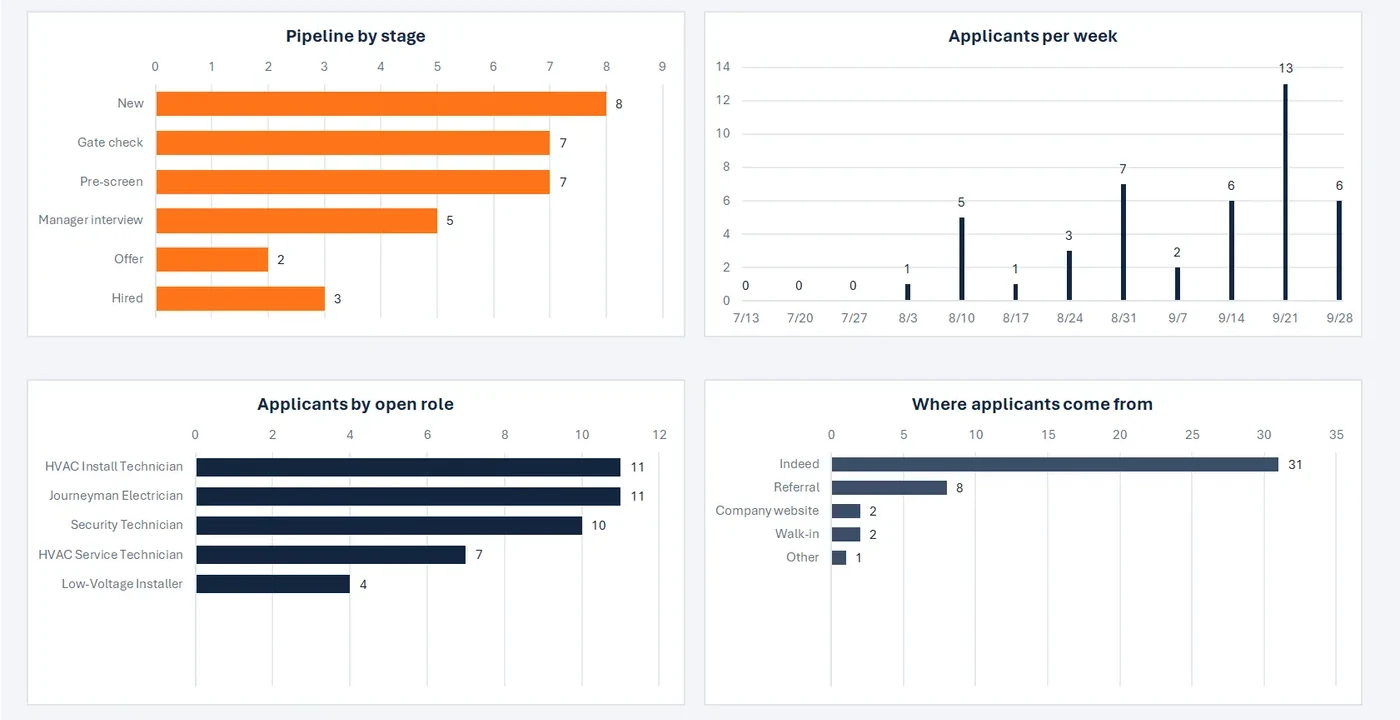
Applicants by open role
Step 1. List your open roles.
The Open Roles tab with sample data: one row per job with trade, location, pay range, and hiring manager.
- 14NEW THIS WEEK
Sample data
Where applicants come from
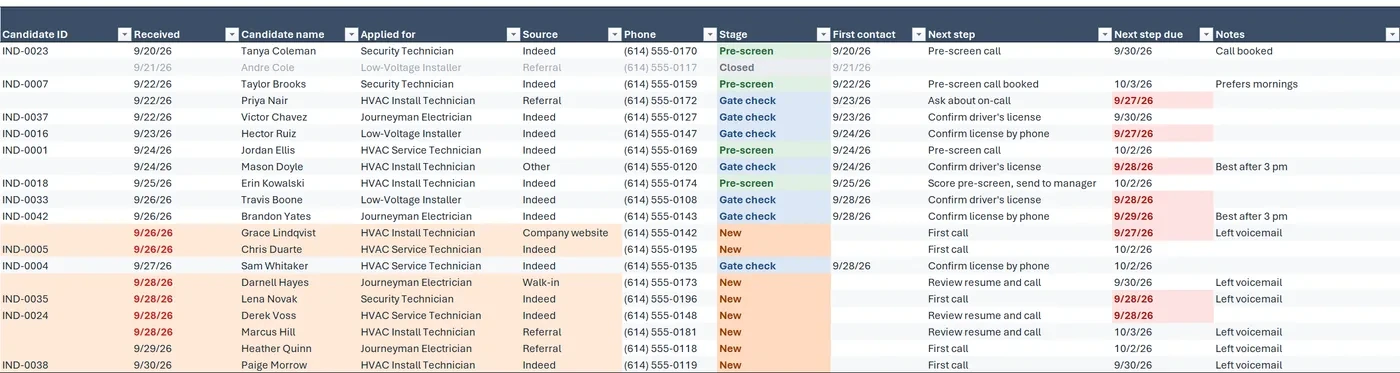
Step 2. Add each applicant as they come in.
The Applicants tab with sample data: one row per applicant. New applicants are shaded and overdue dates turn red.
Gate Questions
Sample data
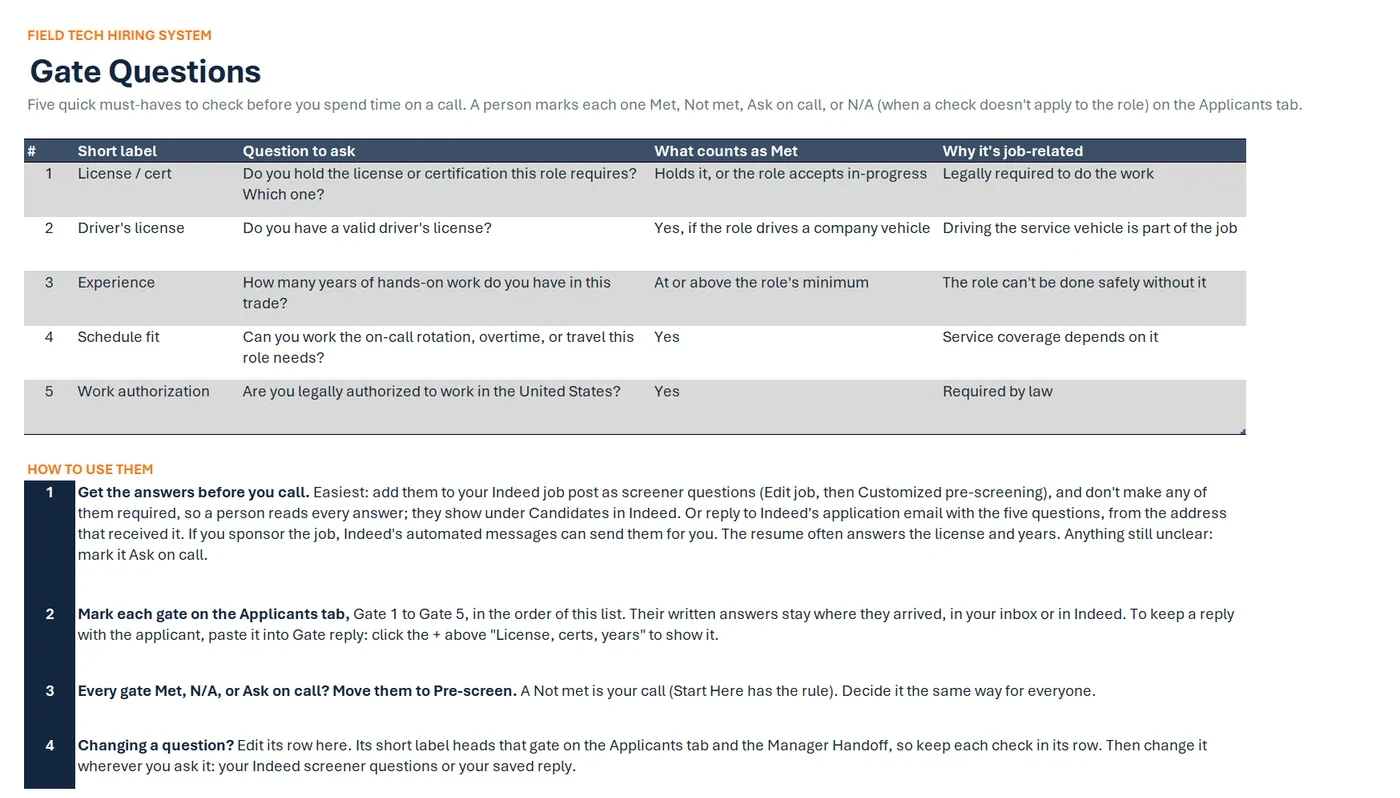
Five quick must-haves to check before you spend time on a call.
- 1License / certHolds it, or the role accepts in-progress
- 2Driver's licenseYes, if the role drives a company vehicle
- 3ExperienceAt or above the role's minimum
- 4Schedule fitYes
- 5Work authorizationYes
A person marks each oneMetNot metAsk on callN/A
Step 3. Get their answers to your gate questions.
Mark each one. The Gate Questions tab shows how.
The Gate Questions tab: five must-have checks, what counts as Met, why each is job-related, how to get the answers.
Pipeline by stage
Sample data
Step 4. Move people through the stages as you call and interview them.
Stage tracking from new applicant to hire, with a next step for each person: pick one from a list of suggested steps or type your own.
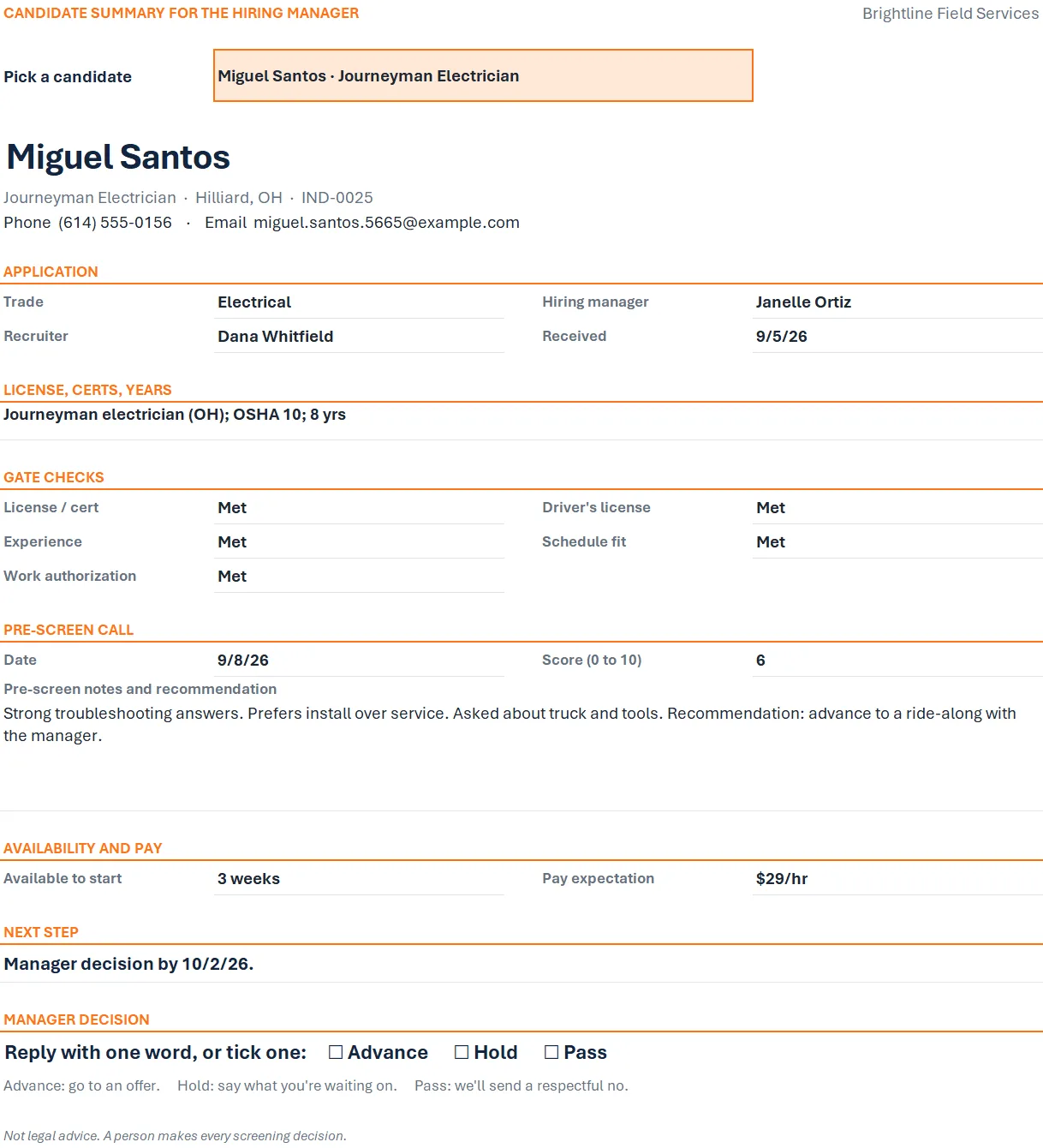
CANDIDATE SUMMARY FOR THE HIRING MANAGER
Sample data
Miguel Santos
Journeyman Electrician · Hilliard, OH
- License / cert
- Met
- Driver's license
- Met
- Experience
- Met
- Schedule fit
- Met
- Work authorization
- Met
Reply with one word, or tick one:
AdvanceHoldPass
Step 5. Send the one-page handoff to the hiring manager.
It goes by email or text, and they reply with one word.
The Manager Handoff tab with sample data: a one-page candidate summary with phone and email, gate checks, and a one-word manager decision line.

Drawn from the sample data in the file. Each step links to the real screen. Made-up data only, in every file and every image.
What's included
- Hiring tracker workbook with seven tabs: Start Here, Dashboard, Applicants, Open Roles, Gate Questions, Manager Handoff (one page), and Settings
- A sample-data copy filled with fake applicants, so you can click around before adding real ones
- A quick-start PDF
Before you buy
- Works in Excel for Microsoft 365 (Windows, Mac, or web) or Excel 2021 or newer.
- Does not work in Google Sheets, Apple Numbers, or Excel 2019 and older.
- Delivered as one .zip file. Unzip it first, then open the workbook.
- Digital download. Nothing is shipped.
A person makes every decision
This is an organizing tool, not legal advice. It doesn't score, rank, or reject anyone automatically. The gate questions are editable examples; check your state and local rules before you use them.
Questions
Does this work in Google Sheets?
No. It's built for Excel: Excel for Microsoft 365 (Windows, Mac, or web) or Excel 2021 or newer. It does not work in Google Sheets, Apple Numbers, or Excel 2019 and older.
Do I need Indeed?
No. The Tracker works with applicants from anywhere: job boards, referrals, walk-ins, or your website. You type them in.
Does the Tracker add applicants automatically?
No. You add applicants by hand, and the Tracker doesn't send anything to applicants. The Full Kit adds two ready-made Power Automate flows, with a setup guide, that turn each Indeed application email into a new row, send your gate questions, and save each reply on the applicant's row. The automation needs Microsoft 365 Business Basic, Standard, or Premium (see the Full Kit page).
How do I get answers to the gate questions?
The easiest way is to add them to your Indeed job post as screener questions, left optional so a person reads every answer: applicants answer while they apply, and you read the answers in Indeed. You can also reply to Indeed's application email with the questions. The Gate Questions tab shows both. Either way, you mark each gate yourself.
Does anything here screen candidates?
No, in either version. Nothing in this kit scores, ranks, or rejects anyone automatically. A person makes every screening decision.
Does it work on a Mac?
Yes, in Excel for Microsoft 365 for Mac or Excel 2021 or newer for Mac.
Are the gate questions legal advice?
No. They're editable examples that help you check the same must-haves for everyone. Check your state and local rules before you use any screening question.
Related tool
Field Tech Hiring System Full Kit
The Field Tech Hiring System Full Kit includes this same tracker, plus two ready-made Power Automate flows to import and a step-by-step setup guide: each Indeed application email becomes a new row in your tracker within a few minutes, your gate questions go to the applicant by email, and their reply is saved on their row.
It also adds a gate question library for field roles, applicant email and text templates, a pre-screen call sheet, and a manager handoff form in Word.
The automation needs Microsoft 365 Business Basic, Standard, or Premium. It already includes the tracker, so you never need both.
See this tool$49.00